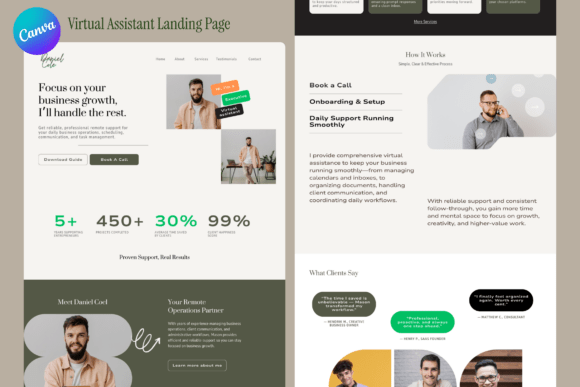
Virtual Assistant Landing Page Canva Template
Professional, Editable, One-Page Website Design for Virtual Assistants
For virtual assistants, executive assistants, and online business managers, building a strong digital presence is essential. But hiring a web developer can be costly and time-consuming. That’s where the Virtual Assistant Landing Page Canva Template comes in. This professionally designed, fully editable one-page website template allows service-based professionals to showcase their skills, experience, and offerings without needing technical expertise.
Created in Canva, this template is intuitive to edit and customize. Whether you're promoting your administrative support services, virtual project management, or client coordination skills, this layout gives you a clean, modern, and trustworthy platform to do so. With its calm color palette, elegant typography, and masculine styling, the design feels premium and approachable—perfect for professionals who want to project confidence and capability.
Why This Template Works for Virtual Assistants
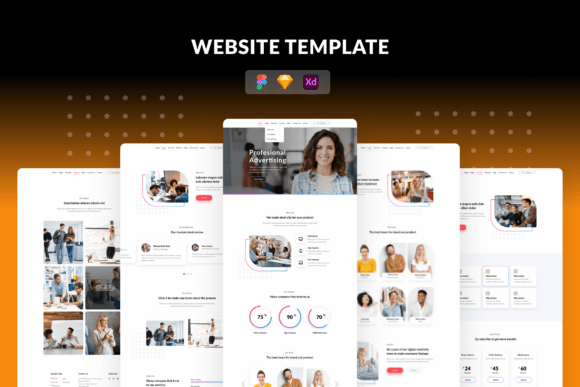
One-page websites are ideal for virtual assistants because they offer a streamlined way to present your value. Visitors can quickly scan your services, read testimonials, view achievements, and take action—all without navigating through multiple pages. This template includes clearly defined sections:
- Hero section – Introduce yourself and your main offer
- Services – Highlight what you do and how you help clients
- About – Share your background and expertise
- Metrics – Showcase achievements, experience, or impact
- Testimonials – Build trust with real client feedback
- Call to Action (CTA) – Encourage visitors to connect or hire you
Each section is thoughtfully spaced and visually distinct, making it easy for your audience to absorb your message. Since the template uses only free Canva assets, you won’t run into licensing issues or hidden costs when customizing it for your brand.
Creative Ways to Customize Your Landing Page
While the template provides a solid foundation, the real value comes from how you personalize it. Here are some creative ideas to make the page your own:
- Switch up the color scheme – Though the original design uses calm tones, you can adjust the palette to match your personal brand colors. Try muted pastels for a softer look or bold neutrals for more authority.
- Add a personal photo or video – A headshot or short intro video in the hero section adds a human touch and builds instant connection.
- Use icons strategically – Enhance your services section with relevant Canva icons that help visitors quickly understand what you offer.
- Include a downloadable resource – Add a section offering a free checklist, guide, or consultation sign-up to grow your email list or generate leads.
- Embed your portfolio or case studies – If you work with visual content or have examples of your impact, use Canva’s embed features to showcase your best work.
By customizing these elements, you turn a standard template into a unique, branded experience that reflects your personality and professional style.
How Different Users Can Adapt the Template
Though designed with virtual assistants in mind, this template is flexible enough for a variety of service-based professionals. Here’s how different users can adapt it:
- Freelance Admin Support Providers – Focus on your specific skills like email management, calendar coordination, or document formatting. Use metrics to show how many clients you’ve supported or how many hours saved per week.
- Online Business Managers – Highlight your experience managing teams, workflows, or systems. Include testimonials from entrepreneurs who rely on your support to scale their businesses.
- Executive Assistants – Emphasize discretion, reliability, and high-level organizational skills. Use the about section to share your professional background and key accomplishments.
- Virtual Creatives – If you’re a VA with a design or content creation background, include a mini portfolio section using Canva’s layout tools to show your visual work.
Each of these roles benefits from a clean, professional presentation that makes it easy for potential clients to understand your value and reach out.
Best Practices for Keeping Your Page Effective
To ensure your Canva landing page delivers results, follow these practical tips:
- Keep copy concise – Use short paragraphs and bullet points to make your page easy to scan. Avoid long blocks of text.
- Use real testimonials – Whenever possible, include quotes from actual clients with names and roles to build credibility.
- Link to your active platforms – Connect your landing page to your LinkedIn, social media, or portfolio so visitors can explore further.
- Update regularly – Refresh your content every few months to reflect new services, achievements, or changes in your offerings.
- Optimize for mobile – While Canva designs are generally mobile-friendly when exported, test your final page on different devices to ensure a smooth experience.
These small but meaningful adjustments help maintain a consistent, professional image that supports your business goals.
Using Your Landing Page Across Platforms
Once your page is ready, you can use it in a variety of ways:
- In your email signature – Link to your landing page as a professional signature block that introduces your services.
- On social media profiles – Use it as your link in bio for Instagram, TikTok, or Twitter to drive traffic to your full profile.
- As a portfolio piece – Share it with potential clients or agencies to quickly showcase your experience and offerings.
- In networking groups – Include it in introductions or digital business cards for virtual or in-person networking events.
Because the template is easy to update and export, you can tailor the content slightly for different audiences while maintaining a consistent brand presence.
Final Thoughts
The Virtual Assistant Landing Page Canva Template is more than just a design—it’s a strategic tool for professionals who want to stand out in a competitive market. Whether you're just starting out or looking to refresh your digital presence, this one-page layout gives you a polished, professional, and easy-to-edit solution that works across platforms and audiences.
By combining practical structure with creative flexibility, this template empowers you to build a landing page that reflects your skills, personality, and professionalism—without the complexity or cost of traditional web design.